
Best legal practice management software
Compare the capabilities that matter after the demo: matters, deadlines, billing, profitability, client collaboration, integrations, and total cost.
Legal practice management software runs a firm’s matters, deadlines, time, billing, documents, and client portal in one system. Clio fits broad integration needs, MyCase and PracticePanther fit simpler billing, CosmoLex fits trust accounting, and The Hammer Lex adds live matter profitability.
This guide is for solo attorneys, small and mid-sized firms, managing partners, and legal operations leaders evaluating a new system in 2026. It focuses on practical buying criteria rather than declaring one universal winner. Vendor features, pricing, and integrations change, so confirm current details directly with each provider before signing.
Key takeaways
- Choose the platform your firm will use consistently, not the one with the longest feature list.
- Clio fits broad integration needs. MyCase and PracticePanther fit simpler billing.
- CosmoLex fits trust accounting. The Hammer Lex adds live matter profitability.
- Billing and profitability are separate questions. Test both in a demo.
- Prices change without notice. Confirm the current figure with each vendor.
What legal practice management software should do
A practice management system should create one dependable record of the firm’s clients, matters, work, money, and communication. At minimum, evaluate whether it can support:
- Intake and conflicts: capture a prospective client, check relevant parties, and create a matter only after the firm clears the opportunity.
- Matter management: organize contacts, parties, notes, tasks, documents, deadlines, and permissions around the matter.
- Timekeeping and billing: record time accurately, apply the right rates, capture expenses, prepare invoices, and support payment collection.
- Deadlines and calendars: turn important trigger dates into visible, explainable deadlines and reminders.
- Client collaboration: give clients an appropriate way to see documents, invoices, messages, receipts, or payment status.
- Reporting: show workload, revenue, realization, collections, and the economics of matters rather than only activity counts.
The system should also make routine work easier for the people who use it every day. A powerful feature that attorneys avoid because it is slow or confusing will not improve the firm’s operations.
What is the difference between practice management and case management?
Practice management software runs the business of the firm across every matter: intake, time, billing, payments, reporting, and staff. Case management software focuses on the legal work inside each matter, such as parties, documents, tasks, deadlines, and case notes, and a single product can cover both.
The label matters less than where the product is strong. A litigation team that lives in the case file may weigh case management depth first; a firm whose pain is unbilled time or unclear margins should weigh billing and reporting first. Ask each vendor which half of the workflow it was built around, and which half depends on an integration or add-on. Then test both halves on the same real matter during the demo.
The 10 legal practice management platforms to evaluate in 2026
These are the ten platforms a US firm is most likely to shortlist. They are listed alphabetically, and they are not scored. A vendor cannot rank its own competitors impartially, so this page does not pretend to. What it does instead is state what each vendor publishes about itself, so you can compare the same fact across all ten.
Disclosure: The Hammer Lex is our own product. It appears in the list on the same terms as the others, including the pricing column.
| Platform | Often a good fit for | What the vendor publishes for pricing | Questions to verify |
|---|---|---|---|
| CARET Legal | Firms wanting practice management with accounting, analytics, and workflow automation in the higher tier. | No list price. Two plans named, Enterprise and Enterprise Plus. "Pricing is per user plus one-time implementation fees." | What is the implementation fee, and which features sit behind Enterprise Plus? |
| Clio | Firms that value a mature legal-tech brand and the largest third-party integration ecosystem. | Entry price only: "Starting at $49/user". The Core and Signature tiers say "Get pricing". | Which modules and add-ons are required, and what is the total cost of the complete stack? |
| CosmoLex | Firms that want legal bookkeeping and trust/IOLTA workflows closely connected to practice management. | All tiers: Core $99 and Pro $129 per user/month, billed monthly. "Save $120 per user with yearly." | Does its accounting model match your accountant, reporting, and integration requirements? |
| Filevine | Litigation and personal injury teams wanting heavily customized case workflows. | No list price. "All packages are custom built for your team's needs." | What does a custom package include, and what changes the price as the team grows? |
| LEAP | Small firms wanting practice management bundled with jurisdiction-specific forms and content. | No list price. "Our team can assist you with pricing based on your needs." A one-time implementation fee may apply. | Is your practice area and jurisdiction covered by the included content library? |
| MyCase | Small firms looking for a polished matter, payments, and client communication workflow. | All tiers: Basic $50, Pro $100, Advanced $130 per user/month billed yearly ($60/$120/$150 monthly). | How well do reporting, advanced operations, and non-standard workflows fit your practice? |
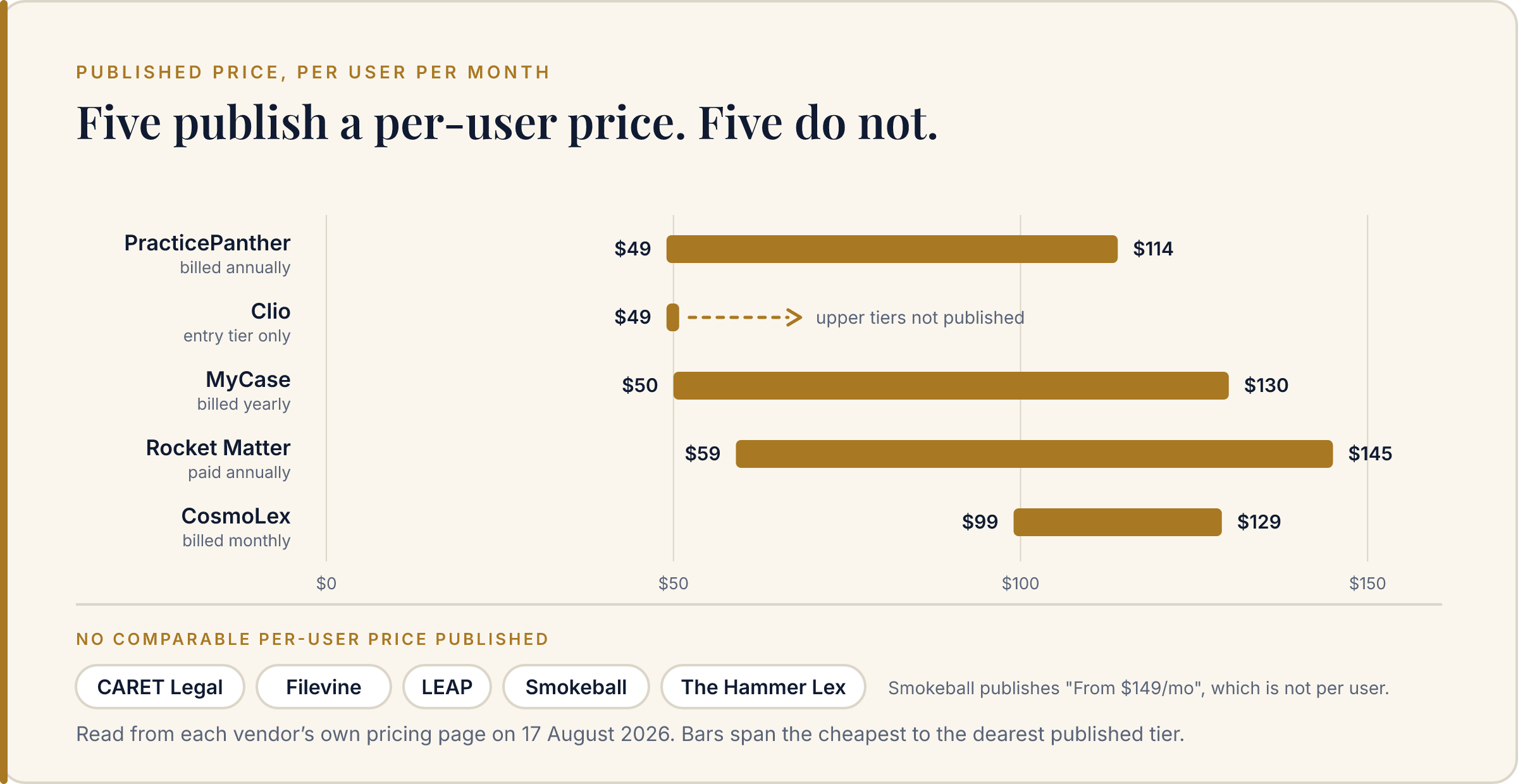
| PracticePanther | Firms looking for approachable automation and standard legal billing workflows. | All tiers: Solo $49, Essential $69, Business $89, Business Pro $114 per user/month billed annually. | Can it provide the profitability, reporting, and staff operations visibility your partners need? |
| Rocket Matter | Firms wanting straightforward billing and matter management with published tier pricing. | All tiers: Essentials $59, Pro $95, Premier $115, Elite $145 per user/month, paid annually. | Which tier holds the reporting and automation your firm actually needs? |
| Smokeball | Firms wanting automatic time capture and a large document automation library. | Partial. Four plans named, each "From $149/mo". Per-user pricing is not published; the page asks for firm size first. | What does the quoted price cover at your headcount, and what is billed per user? |
| The Hammer Lex | Firms seeking connected client-to-cash operations and live profitability by matter, client, practice area, or timekeeper. | No list price. Free to start with no credit card; plans are tailored to firm size and modules on a call. | Confirm the workflows, data migration, integrations, and plan fit for your firm. |
What the pricing column shows
Four of the ten publish a price for every tier: CosmoLex, MyCase, PracticePanther, and Rocket Matter. Two publish a starting figure only — Clio at "$49/user" and Smokeball at "From $149/mo". Four publish nothing at all: CARET Legal, Filevine, LEAP, and The Hammer Lex.
That split matters more than the numbers. A published price lets you build a budget before the first call. A quoted price is set after the vendor knows your headcount and your urgency. Neither approach is dishonest, and a tailored quote can land below a list price. But you should know which conversation you are entering, and you should ask any vendor without published pricing for a written total at your firm's size before you compare it against a vendor that published one.
Free to start, and no credit card. Explore the full feature set with sample data before you move a single matter.
How to choose the right platform
1. Start with the workflow, not the feature checklist
Map the firm’s path from first contact to collected invoice. Ask where information is entered, who owns each handoff, and where work currently leaves the main system. A useful demonstration should follow a real matter through intake, conflict review, matter setup, task and deadline management, time entry, invoice preparation, payment, and reporting.
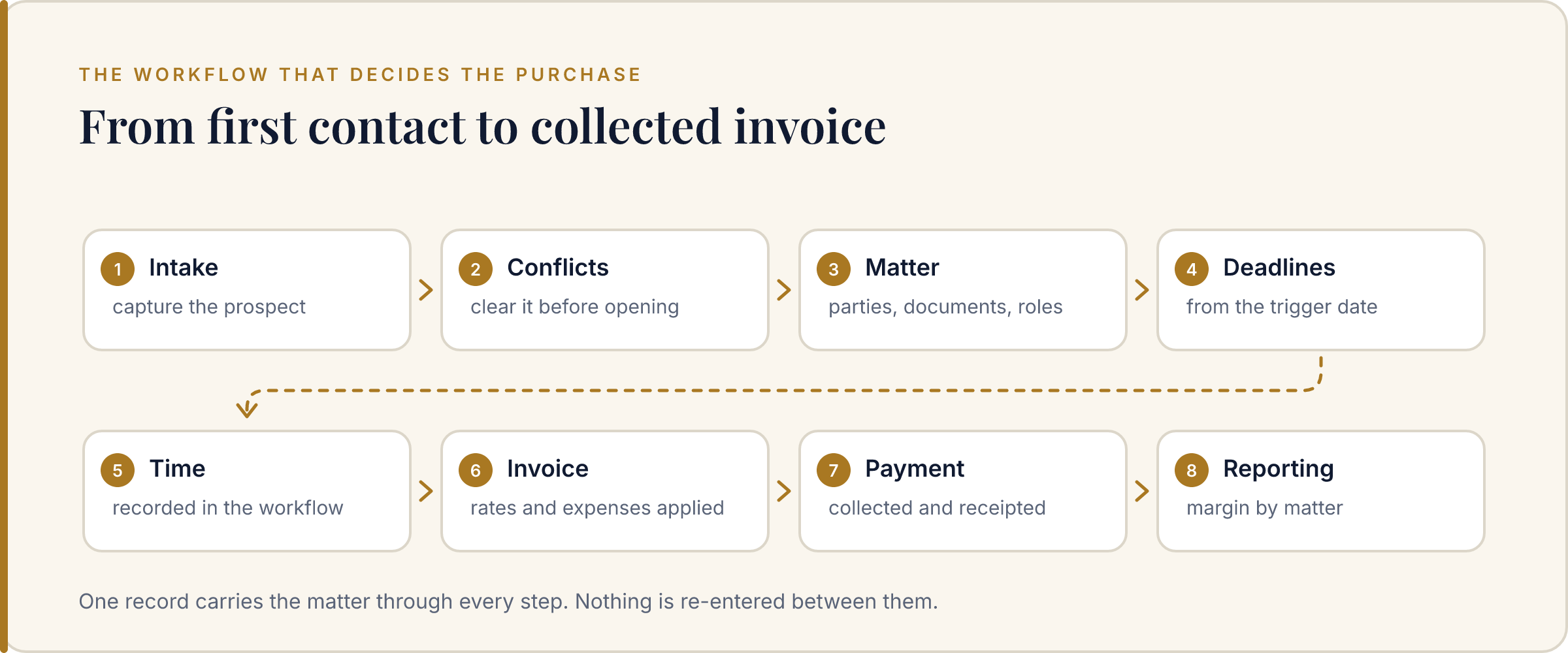
Be especially careful with systems that look complete in a feature grid but require separate products for the handoffs that create risk. A firm can have excellent individual tools and still lack a reliable operating workflow.
2. Treat billing and profitability as separate questions
Billing answers whether the firm can create an invoice. Profitability answers whether the work produced an acceptable return after labor cost, write-downs, overhead, and collection behavior. Those are related, but they are not the same metric.
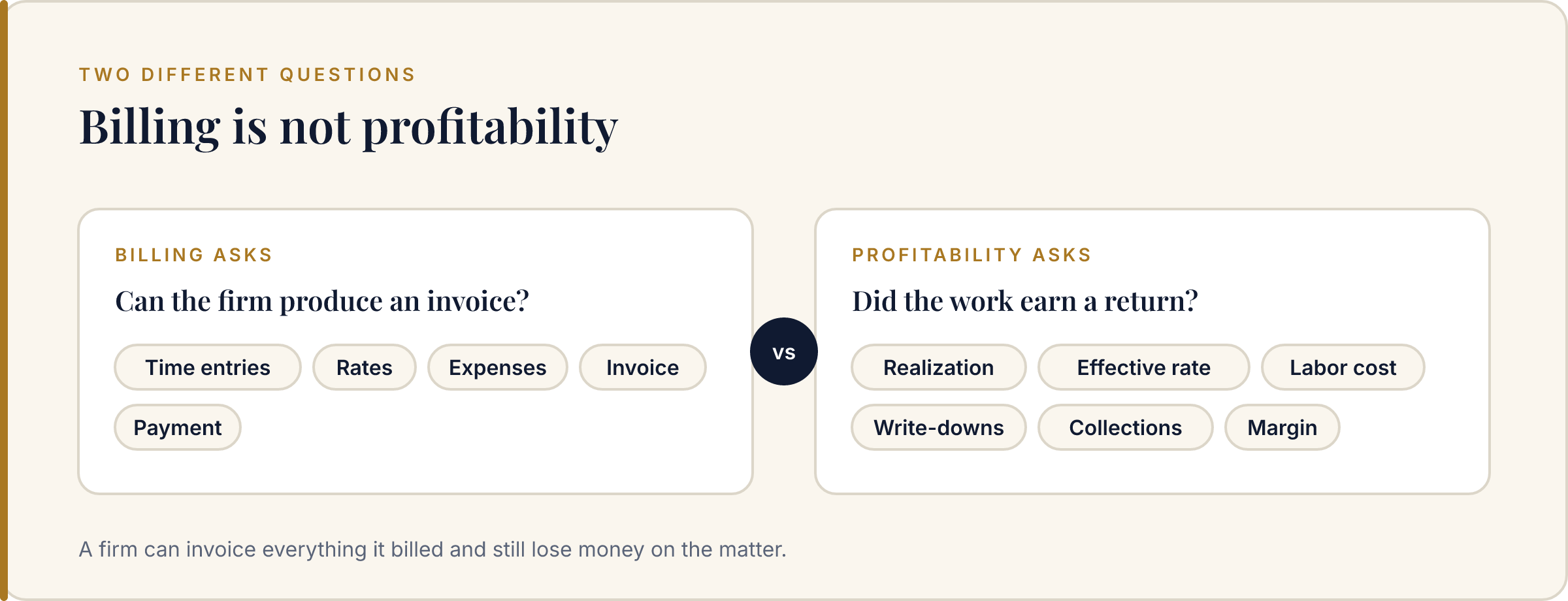
Ask whether the platform can show realization, effective rate, labor cost, margin, and collection status at the matter level. You can test the underlying math with the free matter profitability calculator, then ask each vendor how its product keeps those numbers current as work is logged.
3. Check deadlines, documents, and permissions in context
Legal work is not only contacts and invoices. The right system should make it clear which deadline belongs to which matter, which document version is current, and which client or staff member can see a given item.
Ask for a demonstration of a real jurisdictional deadline, a matter-scoped document share, a client message, and a permission change. These details reveal whether the platform was designed around legal work or simply adapted from generic project management.
4. Evaluate integrations by business dependency
A long integration marketplace is valuable only when it contains the systems your firm actually relies on. List your required connections before comparing vendors: accounting, payments, email, calendar, document storage, e-signature, phone, intake, and reporting.
Then ask what happens when an integration fails. Can the firm export its records? Are sync conflicts visible? Is there an audit trail? Is an API available? A smaller, well-supported integration set can be safer than a large marketplace that leaves the firm responsible for stitching everything together.
5. Compare total cost, not the entry price
Calculate the cost of the complete workflow: licenses, required modules, payment fees, storage, implementation, migration, integrations, support, and the time spent maintaining duplicate systems. Also include the cost of errors that the software should prevent, such as missed time, late invoices, duplicate entry, or unclear matter ownership.
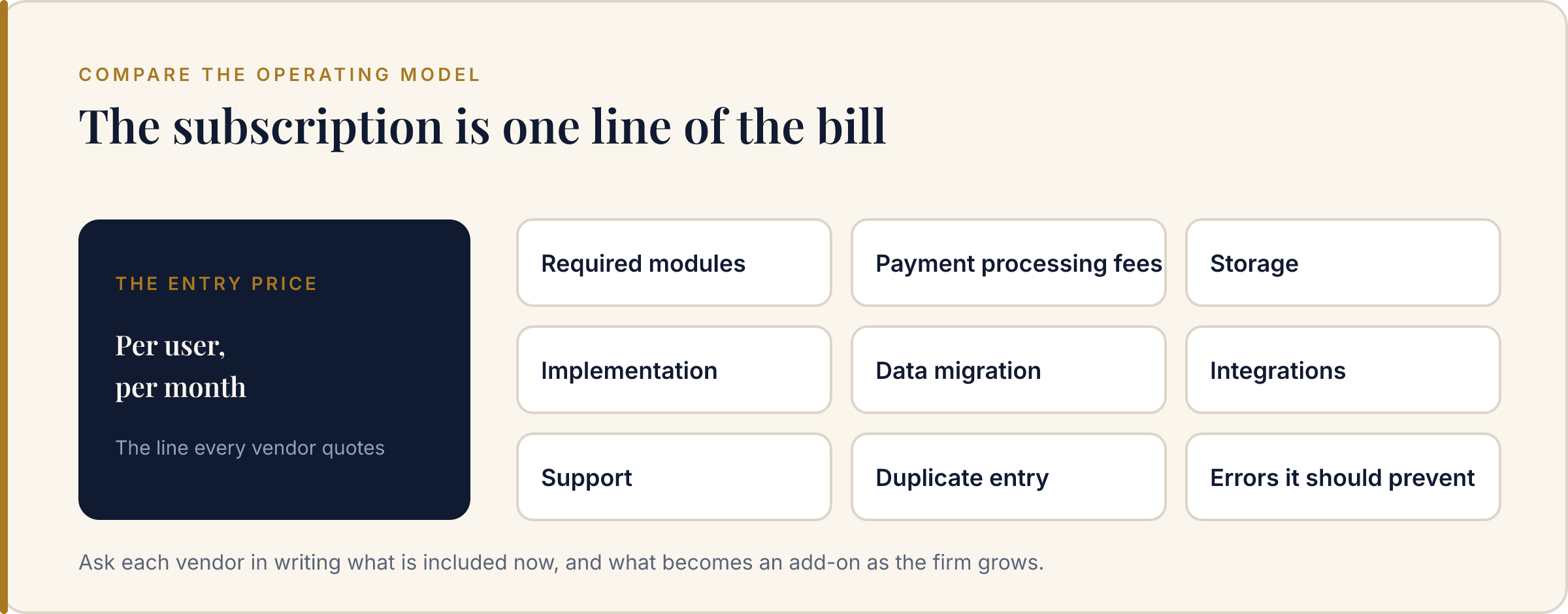
Ask for a written explanation of what is included now and what becomes an add-on as the firm grows. The least expensive subscription is not always the least expensive operating model.
How does trust accounting work in practice management software?
Trust accounting software keeps client funds separate from the firm’s own money and ties every deposit and disbursement to a specific client and matter. The aim is a record that shows, at any moment, how much the firm holds for each client and why each balance changed.
Ask each vendor how the product prevents a disbursement from overdrawing a client’s balance, and how it supports reconciliation against the bank statement. Bar rules on client trust accounts differ by state. ABA Model Rule 1.15 covers safekeeping client property, but your state’s version governs, so confirm your rules with your bar and your accountant. In The Hammer Lex, when a trust balance dips below a threshold, a retainer replenishment request is drafted for partner approval, and invoices export to QuickBooks Online. Ask us the same trust questions you would ask any other vendor.
How does automated conflict checking work?
Automated conflict checking searches the firm’s records for every name on a new inquiry, such as the prospective client and the opposing party, before the firm takes on the work. It flags matches against existing clients, prior matters, and opposing parties so a person can review them before intake goes further.
Ask each vendor what kind of matching it uses and whether a check can be reproduced. In any demo, test misspellings, former names, and company aliases taken from your own files, and ask each vendor how it handles them. The Hammer Lex uses deterministic name matching: the same names checked against the same records return the same result, so a check can be repeated and audited later. It queries existing clients, prior matters, and opposing parties, and a cleared prospect converts to a matter in one click.
How are statutory deadlines calculated in the software?
Rules-based deadline software starts from a single trigger date, such as a date of service or a trial date, and applies the jurisdiction’s rules to calculate each downstream deadline. It counts calendar days or court days as the rule requires and adjusts any deadline that lands on a weekend or holiday.
Ask each vendor which jurisdictions and rule sets it covers, who maintains them when rules change, and whether each calculated date shows the rule it came from. In The Hammer Lex, one trigger date populates the downstream statutory deadlines for the jurisdiction, counting calendar or court days and rolling forward past weekends and holidays. To check the arithmetic yourself, the free court day calculator counts court days forward or backward from a trigger date, skipping weekends and U.S. federal holidays. Have a person review each calculated deadline before relying on it.
What security and privacy questions should a firm ask about calendar and client data?
Ask what the vendor can read, who can switch the connection on, what the data is used for, and how access ends. A calendar connection should be optional, limited to the calendar it needs, used only to deliver the feature, and removable by the user at any time.
For client data, also ask who at the vendor can see it and whether it is used to train AI models. The Hammer Lex calendar connection is optional and off by default. It is created only when an individual user clicks Connect and completes the provider’s consent screen, and firm administrators cannot enable it for that user. It reads and writes events only on the primary calendar, and the data is not used for advertising, sold, transferred to third parties, or used to train AI models. Users can disconnect it or revoke access at any time; see the privacy policy.
Which firms benefit most from an all-in-one system?
An all-in-one platform is usually attractive when the firm has outgrown spreadsheets and point tools but does not want to build an internal software-integration project. It can reduce duplicate entry, create consistent permissions, and give leaders a single place to understand work and money.
It may be a good fit when:
- time, billing, matter data, and reporting do not agree;
- partners cannot see which matters or timekeepers are producing margin;
- staff copy information between a CRM, timer, billing tool, and spreadsheet;
- clients ask for clearer access to documents, invoices, or payment history; or
- the firm is adding people and needs shared permissions, PTO, capacity, or forecasting.
The Hammer Lex’s approach is to connect these workflows around the matter. Explore the full feature set or compare plans and the free-to-start path on the pricing page.
A practical buyer's checklist
Before choosing a platform, ask each vendor to answer these questions using your firm’s own workflow:
- Can we run a conflict check before converting an intake record into a matter?
- Can we configure matter roles, permissions, rates, payors, and billing rules?
- Can the system calculate deadlines from a trigger date and account for court days or holidays where relevant?
- Can every timekeeper record time quickly from the web or mobile workflow we actually use?
- Can we see write-downs, realization, collections, labor cost, and matter margin without exporting to a spreadsheet?
- Can clients access only the documents, messages, invoices, and receipts meant for their matter?
- Can we export our data in a usable format if we change systems?
- What does implementation include, and who owns data migration?
- What is the total annual cost after required modules, payment fees, storage, integrations, and support?
- What will our team use every day, and how will we measure adoption?
Answer this checklist against The Hammer Lex yourself. Free to start, no credit card, and no client data required.
Frequently asked questions
What is legal practice management software?
It brings core law-firm workflows into one system: contacts, matters, deadlines, timekeeping, billing, documents, client communication, permissions, and reporting. One record replaces the spreadsheets, timers, and billing tools most firms run separately, so time entered once appears on the invoice and in the reports.
What is the best practice management software for law firms?
There is no universal best choice. Clio fits firms that need a large integration marketplace. MyCase and PracticePanther fit firms that want simple billing. CosmoLex fits firms that need trust accounting. The Hammer Lex fits firms that want live matter profitability in the same workspace.
How much does legal practice management software cost?
Most platforms price per user per month, and the entry price rarely covers the whole workflow. Add required modules, payment processing fees, storage, implementation, data migration, integrations, and support. Ask each vendor for the total annual cost of the complete stack before comparing subscriptions.
What should a small law firm look for?
Start with matter management, conflict checks, time and billing, document access, client communication, permissions, and data export. Choose the smallest system that supports the next stage of growth. A powerful feature that attorneys avoid because it is slow will not improve the firm.
How long does it take to switch practice management systems?
Plan for weeks, not days. The work is data migration, matter and rate setup, permissions, integration connections, and staff training. Ask who owns migration, what the vendor imports automatically, and what your staff must enter by hand before you agree to a start date.
Is legal practice management software worth it?
It is worthwhile when it reduces duplicate entry, prevents missed deadlines and billing leakage, improves collections, and shows workload and matter economics reliably. Measure it against the cost of the errors it prevents each year, not only against the subscription price.
What is the difference between practice management and case management?
Practice management software runs the business side of a firm across every matter: intake, time, billing, payments, reporting, and staff. Case management software focuses on the legal work inside each matter: parties, documents, tasks, deadlines, and notes. Many products cover both, so ask each vendor which side it was built around.
Can practice management software replace my accounting software?
Often only partly. Some platforms handle both trust and operating accounting, while others integrate with an accounting tool. Decide which system is the book of record for each ledger and confirm that choice with your accountant. The Hammer Lex handles time and billing and exports invoices to QuickBooks Online.
What is deterministic conflict checking?
It applies fixed matching rules, so the same names checked against the same records always return the same result. That makes every check reproducible and auditable later. The Hammer Lex uses deterministic name matching against existing clients, prior matters, and opposing parties before a cleared prospect converts to a matter.
How should a law firm evaluate calendar integration privacy?
Ask whether the connection is optional, who can turn it on, which calendar and permissions it uses, what the data is used for, and how access is revoked. In The Hammer Lex the calendar connection is off by default, only the individual user can enable it, and its data is not sold or used to train AI models.
What should a law firm put in a practice management RFP?
List your practice areas, your state trust accounting rules, your billing arrangements, the integrations you depend on, the data you need migrated, your security requirements, and the reports partners need. Then ask each vendor to demo your own scenarios with your matters and workflows, rather than a scripted tour.
Choose the system your firm can trust
See how The Hammer Lex connects intake, matters, billing, documents, portal access, and live profitability in one workflow.
Free to start, and no credit card. A demo needs no client data — we use sample data or walk through your own workflow.
Related: compare legal practice management platforms · free law-firm calculators